Say Hello to Reamp
Fast. Flexible. High-Fidelity.
Reamp is a music player for macOS 10.14+. Reamp supports a lot of audio formats, custom interfaces called skins from classic Winamp.
Reamp is currently in beta. Your feedback helps us identify issues early and improve the player’s stability, performance, and overall usability in upcoming updates.
Why Reamp?
Everything you’re used to- now on Mac
Reamp carefully brings the workflow and feel of the classic player to macOS, without unnecessary complexity. It’s that familiar way of enjoying music, in a modern environment.
Customize the look and feel to match your taste—from old-school aesthetics to minimalism. You can keep the interface unobtrusive, so nothing distracts you from the music.
A player should open instantly and stay responsive during everyday use. Reamp is built with speed and responsiveness in mind.
Support for many formats means you don’t have to keep converting files before listening. Reamp is designed to work with a diverse music collection.
Find tracks quickly and get back to your favorites instead of browsing endless folders. Albums, artists, and playlists should always be within easy reach.
Local music playback without the noise. If your collection lives on disk, the player should simply do its job. Reamp focuses on playback, not distracting “social” features.
Good controls save time: pause, seeking, next track—everything happens fast. Reamp is made to be pleasant to use every day.
A great player gets better through steady refinement, not loud promises. Reamp evolves to remain simple, stable, and convenient.
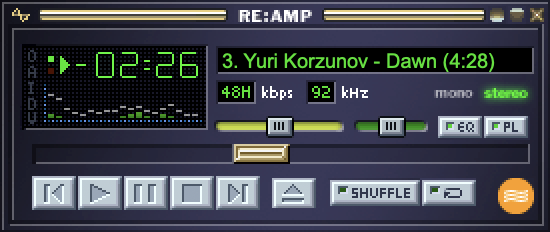
Reamp Interface
- Base skin design
- Basic controls: play, pause, stop, forward song, previous song, select new song
- Built-in spectrum analyzer and oscilloscope
- Track info: author, title, bitrate, sample rate, time, etc.
- Additional controls: position slider, balance, volume, equalizer, playlist, shuffle and repeat
- Can run in unobtrusive windowshade mode.
- All windows dock seamlessly.
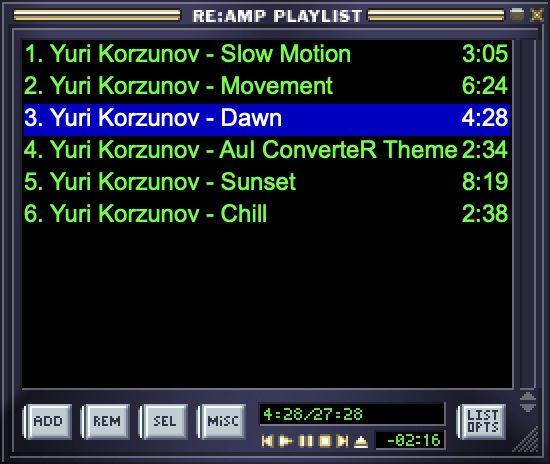
Reamp Playlist
- Drag and drop playlist editing
- Create and save new playlists or load a previous playlist.
- Edit song information via ID3 tag editor.
- Sort by title and filename or randomize.
- Add or remove a song or a block of songs from the playlist
- Delete song files or song listings from the playlist.
- Jump to a song by double-clicking in the playlist.
- Playlist displays current song duration and complete playlist duration for easy dubbing.
- Playlist can run without the main window, and includes mini-controls, time display.
- Playlist can run in title-displaying Windowshade mode.
Reamp Equalizer
- Ten band graphic equalizer and built-in pre-amplifier
- Create and save new pre-amplifier and equalizer settings or load previous setttings.
- Create and save song-specific pre-amplifier and equalizer settings.
- Optionally autoload previously saved song-specific pre-amplifier and equalizer settings on Winamp start-up.
- Spline curve display of EQ settings
- Equalizer can allow user to change Volume and Balance in Windowshade mode.

Reamp Media Library
- A central music library to organize local files in one searchable place.
- Fast browsing and sorting by Artist, Album, Genre, or Year.
- Create, edit, and save playlists directly from the library view.
- Point it at your media and it will scan and add it to your Media Library.
- Easily drag and drop search results to your playlist.
- Instantly generate new playlists based on search results.

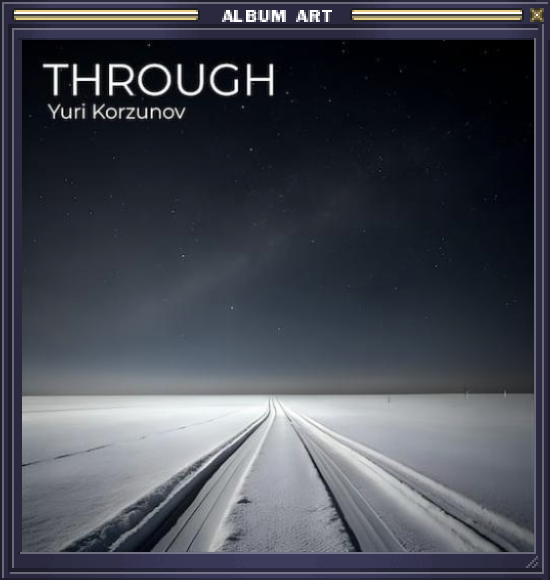
Reamp Album Art View
- Large album artwork display for the currently playing track.
- Quickly browse album covers while listening, with clear artist/album context.
- Keeps essential playback controls close at hand while highlighting the cover art.
- Perfect for “lean back” listening when you want the music front-and-center.
Reamp Tag Editor
- Edit track metadata quickly: Artist, Title, Album, Year, Genre, and more.
- Batch-friendly layout makes it easy to update multiple files without losing focus.
- Keep your library clean and searchable with consistent tags across albums and compilations.
- Update track and disc numbers for proper album ordering everywhere.
- Built-in artwork section lets you review (and manage) cover art right where you edit tags.
- Comments field support helps preserve encoder notes and custom info when needed.
